Flipboard: typing help for every language
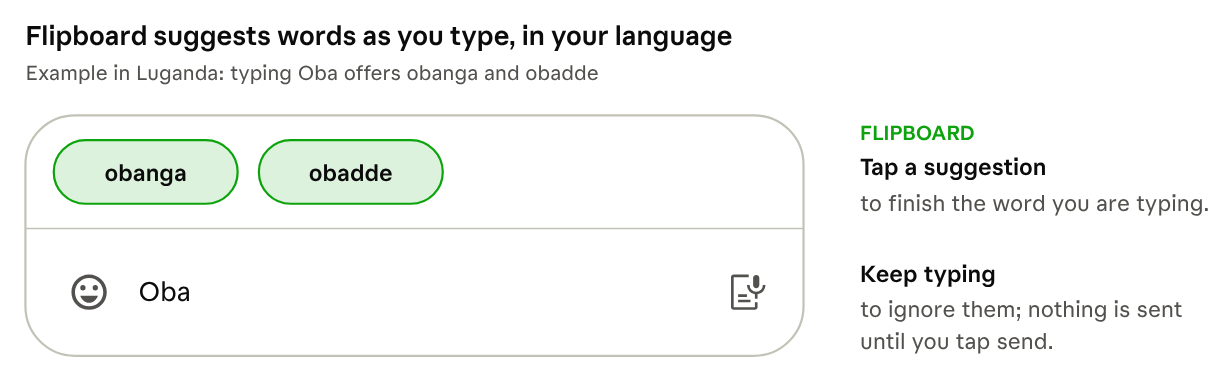
Flipboard is Youflip’s own typing help. As you type, it looks up your words in Youflip’s dictionary for your language and shows suggestions in a green bar above the message box.
Tap a suggestion to finish the word, or keep typing to ignore it. Nothing is sent until you tap send.
A word underlined in red is one our dictionary does not know yet. It may be misspelt, or it may be a correct word we are still missing. You can always send it as it is. Unknown words are counted without any name or account, and a person reviews them before they are added.
Flipboard, Youflip's own keyboard help. Most phone keyboards offer no help in local languages. Flipboard is built by Youflip so that every language in the app gets help as you type.
How it works. As you type, Flipboard looks up your words in Youflip's dictionary for the language you chose, and shows suggestions in a green bar above the message box.
Tap a suggestion to finish the word you are typing. Keep typing to ignore it. Nothing is sent until you tap send.
Red underline. If Flipboard does not know a word, it is underlined in red (see below).
It gets better over time. Words Flipboard does not know are counted without any name or account attached, and a person reviews them before they are added, so the suggestions improve for everyone.
Because Flipboard's dictionaries are still growing for local languages, a suggestion may be missing or not the word you meant.
The red underline. A word underlined in red is a word our dictionary for that language does not know yet. It may be misspelt, or it may be a correct word our dictionary is still missing, which is common in local languages. You can always send it as it is.
Words you type. To improve spell check and suggestions in local languages, the app may count words its dictionary does not know. Only the word, its language and how often it was seen are recorded, with no name or account attached. A person reviews them before any word is added.